
Most owners on Reddit say to go bigger, and one says the size of the room should decide. Read what owners say ↓
What owners on Reddit say
"If you don't buy a tv that matches your seating distance, you will always feel like it's too small." — one owner, r/LGOLED (thread)
"For me, 75/77 is the minimum for anything 8' or over. I couldn't believe the difference back when I went up." — one owner, r/LGOLED (thread)
"Things no one has ever said 'I wish I bought the smaller TV'" — one commenter, r/hometheater (thread)
"Really it depends on the size of your room. 65 feels VERY big in the room I have mine in so there's zero reason for me to have the 77. If my room was bigger I'd go bigger." — one owner, r/LGOLED (thread)
Most owners say go bigger. The ones who do not say the room decides. Measure your seat to the wall first.
Who's this for? Anyone picking a TV size for a specific room — especially NYC apartments where the couch-to-wall distance is fixed and you can't just "sit farther back."
This guide covers the modern viewing-distance rule, a size-by-distance table, mounting height, and a step-by-step way to measure your room.
On this page
The modern viewing-distance rule
The old advice — sit 8 to 10 feet from any TV — came from the standard-definition era, when sitting too close meant seeing individual scan lines. With today's 4K panels, the picture has roughly four times the detail. You can sit much closer before anything looks soft. That changes the math completely.
Two industry standards drive the modern recommendation. The film body SMPTE suggests a viewing setup where the screen fills about a 30-degree horizontal field of view — comfortable for everyday watching. THX, the cinema-certification group, pushes for a more immersive 36 to 40 degrees, closer to what you'd get in a good movie theater. The wider the angle the screen fills, the more "in it" you feel.
You don't need a protractor on your couch. The shortcut most installers use is the screen diagonal multiplier:
- Immersive (THX-style, ~40 degrees): sit about 1.2 times the screen diagonal away.
- Balanced (a comfortable middle): about 1.4 times the diagonal.
- Relaxed (SMPTE-style, ~30 degrees): about 1.6 times the diagonal.
So for a 65-inch TV, immersive seating is roughly 6.5 feet and relaxed seating is closer to 9 feet. Anywhere in that band looks great on a 4K screen. Sit much farther than the relaxed end and the TV starts to feel small; sit much closer than the immersive end and your eyes have to dart around to follow the action.
One more honest note: if you're feeding the TV mostly 1080p cable, older streaming, or compressed content, lean toward the relaxed end. Lower-resolution sources show their flaws when you sit close.
Size-by-distance table
Find how far your seat is from the wall, then read across to the size that fits. The ranges below assume 4K content and cover the immersive-to-relaxed band.
| TV Size | Immersive (~1.2×) | Balanced (~1.4×) | Relaxed (~1.6×) | Best seating range |
|---|---|---|---|---|
| 55-inch | 4.5 ft | 5.3 ft | 6.1 ft | 4.5 – 6 ft |
| 65-inch | 5.4 ft | 6.3 ft | 7.2 ft | 5.5 – 7 ft |
| 75-inch | 6.2 ft | 7.3 ft | 8.3 ft | 6 – 8.5 ft |
| 85-inch | 7.1 ft | 8.3 ft | 9.4 ft | 7 – 9.5 ft |
How to read it: if your couch sits about 7 feet from the wall, a 65-inch lands at the relaxed end and a 75-inch lands at the balanced end — both are excellent, and a 75-inch will feel noticeably more cinematic. If your seat is only 5 to 6 feet back, a 55- or 65-inch is the sweet spot.
A useful rule of thumb: measure your seating distance in feet, multiply by 9 to 11, and that's a good TV-size range in inches. A 6-foot distance suggests roughly a 55- to 65-inch screen; an 8-foot distance suggests a 70- to 85-inch screen. Most people are happier going one size up rather than one size down.
Seated eye-level and mounting height
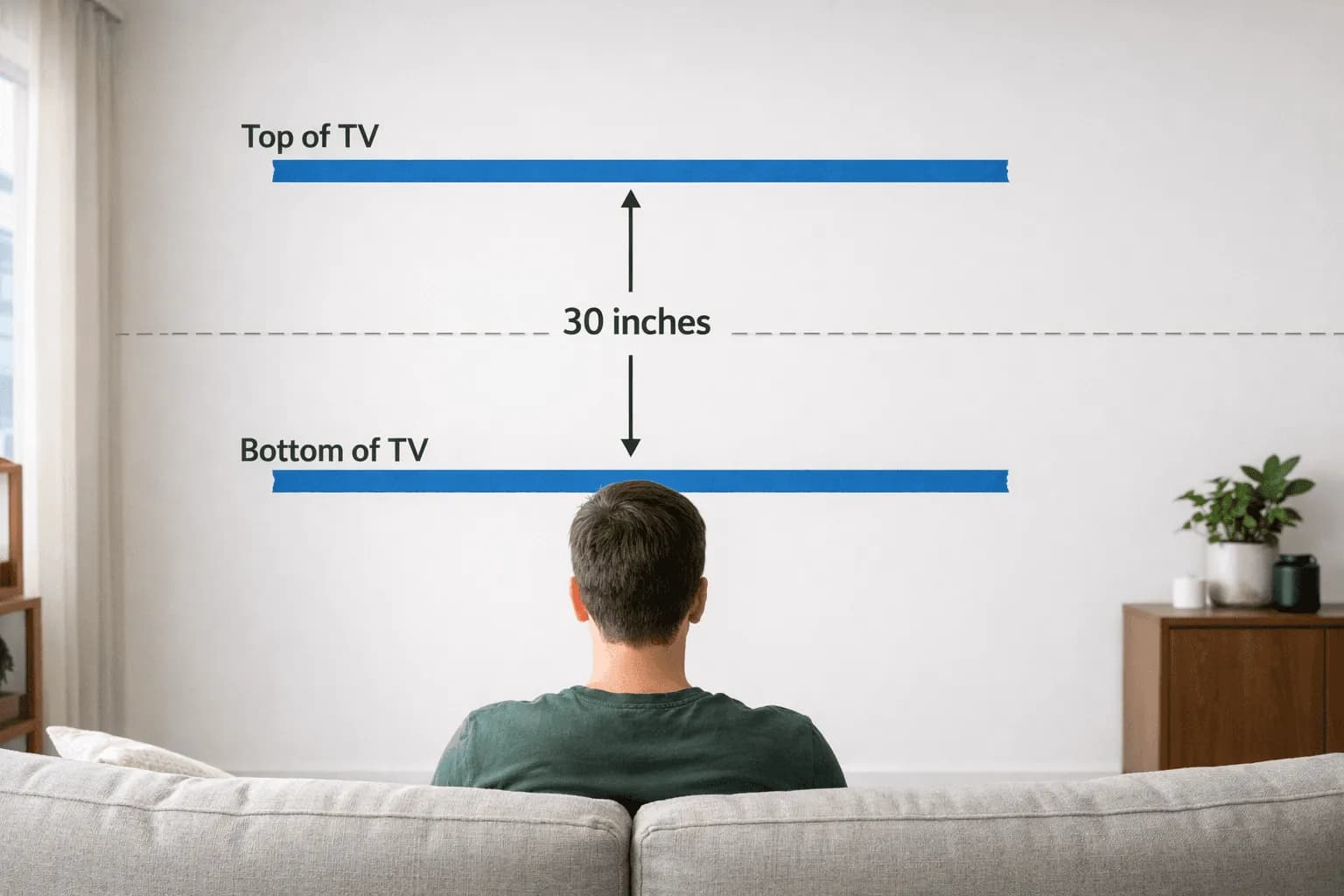
Distance is only half of comfortable viewing — height is the other half. The goal is for the center of the screen to sit near your eye level when you're seated. For the average adult on a standard sofa, that puts the screen center around 42 inches off the floor.
Eyes that look slightly down or straight ahead are comfortable for hours. Eyes craned upward are not. This is where a lot of DIY mounts go wrong — people hang the TV "to fill the wall," end up with the screen center at 55 or 60 inches, and then wonder why their neck aches after a movie.
We walk through the exact numbers — couch height, low seating, the kitchen exception, and the lie-down-and-look-up math for bedrooms — in our TV mount height guide.
If your only viable wall is above a fireplace or the screen has to go higher than ideal, a tilting mount angles the picture down toward your seat and recovers most of the comfort. Worth raising before installation, not after.
The small-NYC-apartment reality
Here's the truth almost no size calculator admits: in a typical NYC living room, you can't always sit as far back as the chart wants you to. Prewar layouts are narrow, the couch backs up to a wall or a walkway, and the distance from sofa to TV wall is often a fixed 6 to 8 feet. You can't move the wall, so you size the TV to the seat.
That actually makes the decision easier. Measure your real seating distance first, then choose the largest size that still fits the relaxed end of the table. Because 4K lets you sit closer without seeing pixels, most NYC apartments comfortably handle a bigger TV than people assume — a 65- or 75-inch in a room where folks instinctively reach for a 55-inch.
A few apartment-specific things to weigh:
- Door and elevator clearance. An 85-inch box is genuinely large. Confirm it fits through your building's entrance and your apartment door before you order.
- Wall type. Prewar plaster and brick hold weight well but need the right anchors; modern drywall needs the studs found and used. We route cables inside the wall on drywall only — on plaster, brick, and concrete we hide them in a paintable surface raceway instead.
- Glare. Narrow rooms often put the TV opposite a window. A slightly smaller, well-placed screen beats a giant one you can't see in daylight.
If your room genuinely can't seat the size you want, a floating TV stand can buy you a few inches of flexibility and keep cables tidy without a full built-in TV wall. And if you're building a dedicated room, our home theater installation service sizes the screen, seating, and acoustics together from the start — see our take on big-screen front projection in the best home theater projector guide.
For the screen itself and the mounts that go with it, our recommendations tool shows our picks — see also the TVs we sell.
How to measure your room (step by step)
Spend five minutes here and you'll never second-guess the size again.
- Measure seating distance. With a tape measure, find the distance from the front face of your TV wall to where your eyes sit on the couch — the back cushion, not the front edge. Write it down in feet.
- Convert to a size range. Multiply that distance (in feet) by 9 and by 11 to get your low and high size estimates in inches. A 7-foot distance gives you roughly 63 to 77 inches — so a 65- or 75-inch.
- Check the table. Confirm your chosen size lands inside its "best seating range" above for your measured distance. If you're between sizes, go up.
- Find your seated eye level. Sit where you actually watch, and measure from the floor to your eye height. That number is roughly where the center of the screen should land — usually near 42 inches.
- Mark the mount height. Subtract half the TV's height from your eye-level number to find where the screen's top edge and bracket go. (A 65-inch is about 32 inches tall, so its center is about 16 inches above the bracket's anchor zone — your installer will dial this in exactly.)
- Tape a template. Cut a paper or cardboard rectangle to the TV's width and height, tape it to the wall at your marked height, then sit down and look. If it feels right from your seat, it is right. Adjust before anything gets drilled.
- Confirm clearance and walls. Check door and elevator access for the box, and identify your wall type so the right anchors and cable plan are ready on install day.
When the planning's done and you want it on the wall — level, at the correct height, with cables managed — we handle the drilling, the wall type, and the cleanup. Your final price depends on the services and options you choose plus the distance from Midtown Manhattan — you'll see the estimated total before you submit your booking request. You can start your booking here or call us at (646) 912-5050.
Frequently Asked Questions
How far should I sit from a 65-inch TV?
For a 4K 65-inch TV, sit roughly 5.5 to 7 feet away. The closer end (about 5.4 feet) gives a more immersive, theater-like view. The farther end (about 7.2 feet) is a relaxed, all-day-comfortable distance. Anywhere in that band looks sharp on a modern panel.
What size TV is best for my room?
Measure the distance from your TV wall to your seat in feet, then multiply by about 9 to 11 to get a size range in inches. A 6-foot distance suggests a 55- to 65-inch; an 8-foot distance suggests a 70- to 85-inch. When you're between two sizes, most people are happier sizing up — especially with 4K.
Can I sit too close to a 4K TV?
It's much harder than it used to be. Because 4K screens pack about four times the detail of HD, you can sit at roughly 1.2 times the screen diagonal — the immersive end of the range — without seeing pixels. The main caveat is content: lower-resolution cable or compressed streaming looks softer up close, so lean a little farther back if that's most of what you watch.
Is a bigger TV always better in a small NYC apartment?
Not always, but bigger is usually under-ordered, not over-ordered. The limits are practical: door and elevator clearance for the box, glare from a nearby window, and whether the screen forces your eyes to scan from your fixed seating distance. Size to the relaxed end of the table for your real seating distance and you'll typically land a size larger than you expected — comfortably.
How high should I mount my TV for the best viewing?
Aim for the center of the screen to sit near your seated eye level — about 42 inches off the floor for most adults on a standard sofa. If the only good wall puts the TV higher (above a fireplace, for example), a tilting mount angles the picture down to your seat and recovers most of the comfort. Our height guide has the exact numbers for sofas, recliners, and bedrooms.
Does viewing distance change the TV mounting height?
Indirectly, yes. The farther you sit, the more forgiving the height becomes — but the target stays the same: screen center near seated eye level. The bigger factor is that a larger TV (chosen for a longer distance) is taller, so its bracket sits lower on the wall to keep the center at eye level. We set both the size-appropriate height and any tilt during installation — book a visit and we'll dial it in.