

Owners on Reddit are split: some love the glow with colorful content, and others find it uncomfortable or unneeded on a good OLED or Mini LED. Read what owners say ↓
What owners on Reddit say
"Personally I find it adds a lot to colorful content. Gaming and animation being the obvious main examples but also movies that are really colorful look good too." — one owner, r/hometheater (thread)
"If you have a cheap LED TV in a dark room, it can definitely help with blooming and raised blacks. But if you have decent Mini LED or OLED I would avoid it." — one commenter, r/hometheater (thread)
"I find any bias lighting in a darkened room to be very uncomfortable to the point I pretty much will not watch it. I have asked for it to be turned off multiple times." — one owner, r/hometheater (thread)
Bias lighting splits owners. Your TV and your own eyes decide if it helps.
Who's this for? Anyone with a TV, especially in a dark room. Renters can do it with no drilling and no damage.
This guide covers why it works, how to pick the right type, how to install it yourself, and when it's worth hiring a pro.
Want it done right — hidden, color-matched, integrated with your mounted TV? Our LED accent lighting service handles placement, wiring, and smart-home sync. Browse everything on the services page and book your installation when you're ready.
On this page
What bias lighting actually is
Bias lighting is a low, even light placed behind your television that washes the wall directly behind and around the screen. You don't see the light source itself — you see the soft halo it throws onto the wall. The screen appears to float in a gentle pool of light instead of a black void.
The idea comes from professional color-grading suites and broadcast control rooms, where editors keep a controlled light behind their reference monitors. That light gives your eyes a stable reference point so the image looks accurate and comfortable. The same principle works just as well in a Brooklyn living room as it does in a studio.
Key thing to understand: bias lighting is not about lighting the room. It's about lighting the small zone immediately around the screen. A little goes a long way.
Why it reduces eye strain and improves contrast
When you watch a bright screen in a dark room, your pupils are caught in a tug-of-war. The screen is bright, the wall behind it is black, and your eyes constantly adjust between the two. That repeated adjustment is a big part of what makes late-night TV feel tiring.
Bias lighting fixes this by raising the brightness of the area around the screen to a comfortable middle ground. Your pupils settle into one comfortable state instead of bouncing. The result is noticeably less fatigue during long sessions — which matters when your TV doubles as the screen for movies, gaming, and working from home.
There's a real contrast benefit too. Because of how human vision works, a dark area looks even darker next to a slightly lit surface. The soft glow behind the TV makes the blacks on screen appear deeper and shadow detail more defined — even though nothing about the TV's output has changed. You get richer perceived contrast for free.
Pair that with clean cable management behind the screen and the whole setup looks intentional rather than improvised.
Types of TV backlighting
Not all TV backlights are the same. Here's how the common options compare.
USB-powered LED strips
The simplest and most popular option. A flexible strip with adhesive backing sticks to the back edges of the TV and plugs into the TV's own USB port. When the TV turns on, the light turns on. No extra outlet, no remote to lose. For most apartment dwellers, this is the easy, renter-friendly default.
Addressable / sync systems
These use strips with individually controllable LEDs and a small controller box. A camera or HDMI device reads what's on screen and pushes matching colors out to the edges of the wall in real time. When a fire fills the screen, the wall glows orange; when a scene goes blue, the wall follows. It's immersive and genuinely impressive — and it's the kind of effect we build into a full home theater installation.
Screen-color-matching strips
A middle ground. These sample the average color of the screen and gently shift the backlight to match — without the per-zone precision (or price) of a full addressable rig. Great if you want a little life behind the TV without going all in.
For specific product picks across all three categories, see our curated gear recommendations — or let the setup finder walk you through it based on your room and goals.
Choosing brightness and color temperature
Two settings make or break a bias light.
Color temperature. Aim for roughly 6500K — often labeled "D65" or "daylight." This matches the white-point reference TVs are calibrated to, so the glow behind the screen matches the neutral white of the image and never tints your perception of on-screen color. Warmer (yellow) or cooler (blue) light will throw off how accurate the picture looks. If your strip lets you dial in a specific temperature, set it to 6500K and leave it.
Brightness. Less than you'd think. The glow should be clearly visible but never so bright that it competes with the screen or casts a hard pool of light. A good rule of thumb: in a dark room, the wall behind the TV should look softly lit, and you should never be tempted to glance at the light instead of the show. Most quality strips include a dimmer — start low and nudge it up until it feels comfortable.
How to install bias lighting (renter-safe)
Here's a no-damage approach that works in any NYC apartment and comes off clean when you move out.
-
Clean the back of the TV. Wipe the rear panel near the outer edges with a little rubbing alcohol and let it dry. Adhesive sticks far better to a clean, dust-free surface — this single step prevents strips from peeling later.
-
Plan the run before you peel. Lay the strip loosely around the back perimeter of the TV, about an inch or two in from the edges, to confirm the length and where the corners fall. Most strips are cut-to-length at marked points if you have extra.
-
Stick it down, corner by corner. Peel the backing a few inches at a time and press the strip onto the back of the TV — not the wall — following the perimeter. At each corner, gently bend the strip rather than creasing it sharply. Pressing the TV itself keeps everything renter-safe: no adhesive ever touches your landlord's wall.
-
Route the cable to power. Run the lead wire to the TV's USB port (or the included controller, then a nearby outlet). Use removable adhesive clips or cable channels to keep the wire tidy along the back of the set. If your TV is on a stand, tuck the slack behind it.
-
Power on and tune. Turn on the TV, switch on the strip, set the color to 6500K, and dial the brightness down to a soft glow. Sit where you normally watch and adjust until the wall looks gently lit and your eyes feel relaxed.
A note on wiring: running power inside a wall is a drywall-only job and requires the right approach to stay up to code — we never route cable through plaster, brick, or concrete. For a surface install like this, everything stays on the back of the TV, so there's nothing to open up.
Syncing with content and your smart home
This is where bias lighting goes from "nice" to "wow." Sync-capable systems read your screen and match the wall color to the action in real time. The picture feels larger than the panel itself — your peripheral vision fills in with light that belongs to the scene.
Many systems also tie into smart-home platforms apartment dwellers already use, so the backlight can react to voice commands, dim automatically when a movie starts, or join a scene that also lowers your other lights. The convenience is real: one tap and the TV bias light comes up, the lamps fade, and the room is ready.
Done well, the lighting becomes part of the room's design rather than a gadget bolted to the TV. If you're already thinking about immersive sound, our Dolby Atmos guide pairs naturally with synced lighting for a complete experience.
Combining it with a mounted TV or built-in TV wall
Bias lighting looks its best when the TV is mounted flush and the wiring disappears. A TV sitting on a stand with a tangle of cords undercuts the clean, floating effect. A properly mounted television with hidden cables lets the glow do its job without distraction.
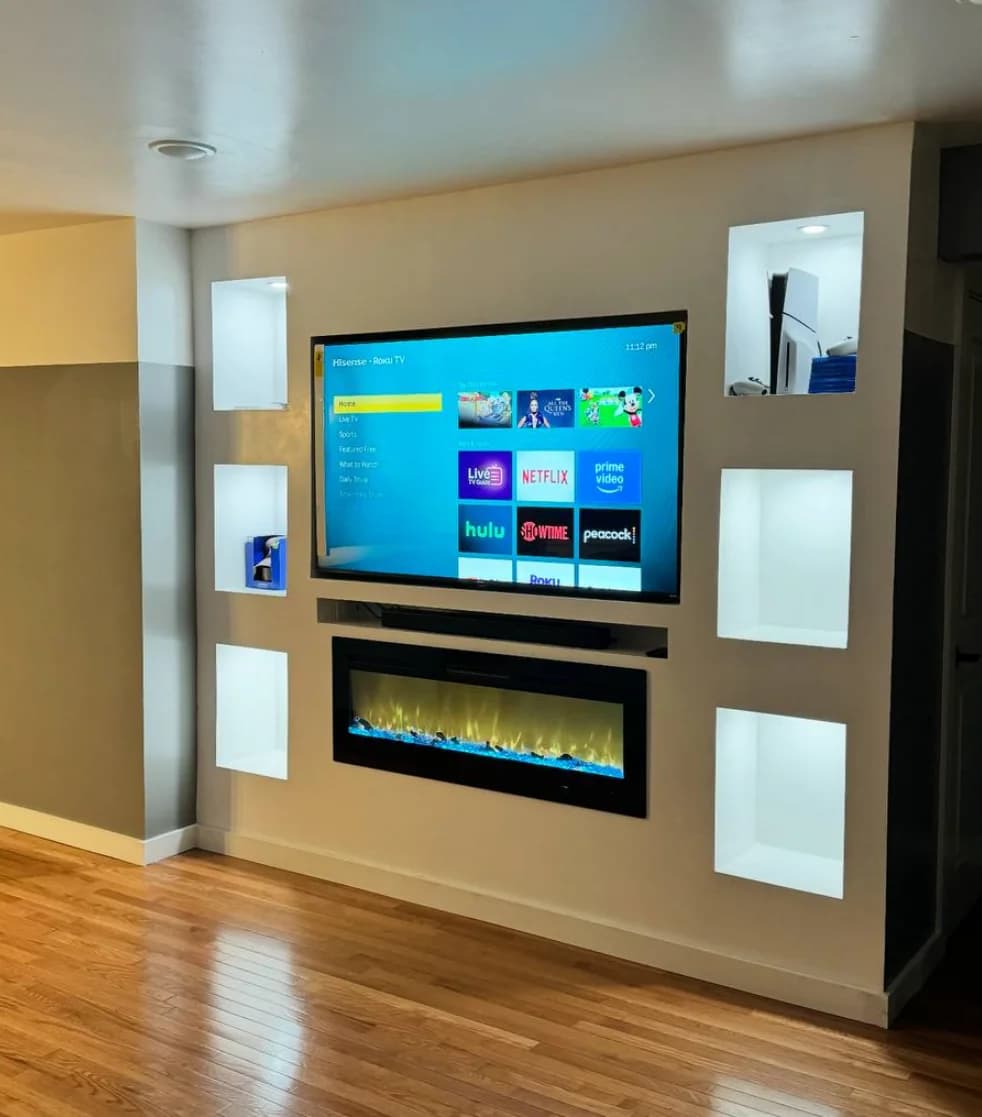
The premium version is integrated LED built into a custom built-in TV wall — strips recessed behind floating shelves, accent niches, or the TV alcove itself, so the light reads as architecture rather than an add-on. That's the difference between a strip stuck on the back of a TV and a room that looks designed around the screen.
When you book TV mounting with us, LED accent lighting is an add-on service — we place and conceal the strips as part of the install rather than leaving you to peel-and-stick later. Your final price depends on the services and options you choose plus the distance from Midtown Manhattan, and you'll see the estimated total before you submit your booking request. Learn more on the LED installation page.
Pro vs. DIY
For a simple USB strip on a TV that's already on a stand, DIY is completely reasonable — follow the steps above and you'll have a clean result in twenty minutes.
Bring in a pro when the lighting needs to integrate with a mounted TV, hidden wiring, an addressable sync system, or a built-in TV wall. Concealing cables, getting the run perfectly even, tying into your smart home, and making the light look built-in is fussy work — and it's exactly what we do every day across NYC.
Not sure which route fits your space? Call us at (646) 912-5050 to talk it through, or book your installation online and we'll handle the rest.
Frequently Asked Questions
Does TV bias lighting really reduce eye strain?
Yes. Watching a bright screen against a dark wall forces your pupils to constantly readjust, which is a major cause of viewing fatigue. Bias lighting raises the brightness around the screen to a comfortable middle level so your eyes settle into one state. The effect is most noticeable during long sessions in a dark room — movies, gaming, or late-night streaming.
What color temperature should TV bias lighting be?
Around 6500K, often labeled "D65" or "daylight." This matches the neutral white-point that TVs are calibrated to, so the glow behind the screen doesn't tint how you perceive on-screen color. Warmer or cooler light can make the picture look slightly off — stick with 6500K for the most accurate result.
Will an LED strip behind my TV damage my apartment walls?
No, if you install it correctly. Stick the adhesive strip to the back of the TV itself, not to the wall, so nothing touches your landlord's paint. Use removable cable clips for the wire. When you move out, the strip peels off the back of the TV and leaves your walls untouched — a fully renter-safe setup.
Can I sync the backlight to what's on screen?
Yes. Addressable sync systems use a camera or HDMI device to read the screen and push matching colors out to the wall in real time, so the lighting follows the action. Screen-color-matching strips do a gentler version by shifting to the average on-screen color. We build full sync systems into our home theater installations.
How bright should bias lighting be?
Softer than most people expect. In a dark room the wall behind the TV should look gently lit, and you should never be tempted to look at the light instead of the screen. Start with the dimmer low and raise it just until the glow is comfortable. Too bright and it competes with the picture; too dim and you lose the eye-strain benefit.
Should I get bias lighting installed professionally?
For a simple USB strip on a stand-mounted TV, DIY is easy. Bring in a pro when you want the lighting integrated with a wall-mounted TV, hidden wiring, an addressable sync system, or a custom built-in TV wall — concealing cables and making the light look built-in is where professional installation pays off. Book online or call (646) 912-5050 to get started.