On this page
The 65-inch TV is the sweet spot for most NYC living rooms. It is large enough to fill a wall without overwhelming a typical apartment-sized room. But at 40 to 65 pounds depending on the model, a 65-inch TV is not something you want falling off the wall because of a cheap mount or bad hardware.
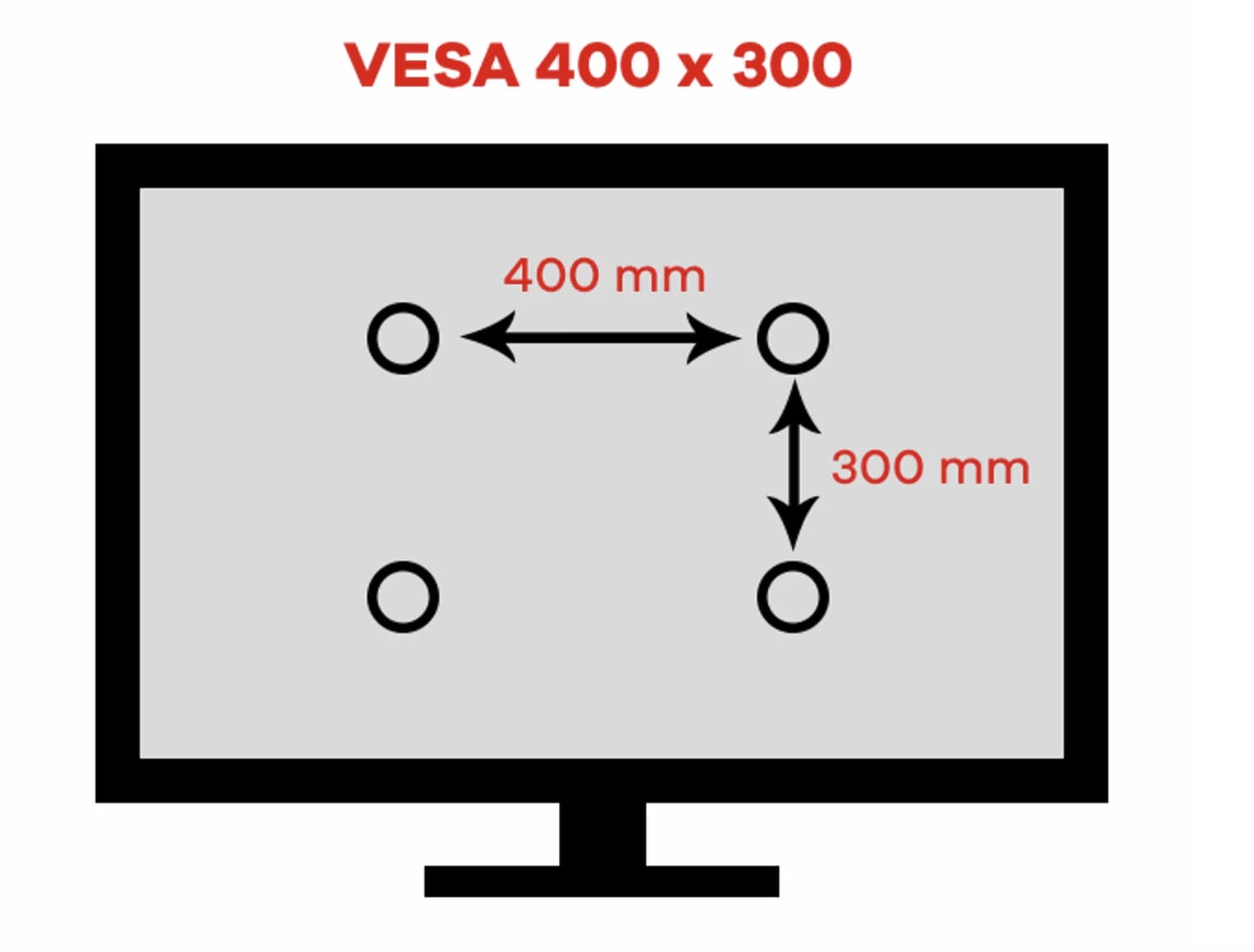
Most 65-inch TVs use a 400x400mm VESA pattern, though some premium models use 600x400mm. The mount you choose needs to match your TV's VESA pattern and be rated for well above your TV's actual weight. We use mounts rated for at least 99 pounds for any 65-inch installation.
The biggest mistake we see with 65-inch TVs is people buying a mount rated for the right size range but not checking the VESA pattern. A mount that fits 42 to 70 inch TVs might only support VESA up to 400x400mm, which will not work with a premium 65-inch panel that uses 600x400mm.
What owners on Reddit say
"If you pull the TV out from the wall on that articulating arm theres a decent chance of disaster as the leverage forces will start getting quite large" — one commenter, r/hometheater (thread)
"I wouldn't. Especially if your sheetrock is old. How could you not find a stud?" — one commenter, r/hometheater (thread)
"But it's an extending, pivoting mount.... that means the mechanical stress produced by the 40 pounds of the TV get exponentially higher the farther away you pull it from the wall and that's where I'd start to sweat." — one commenter, r/hometheater (thread)
That thread was about a 65-inch TV on drywall anchors alone. The answer from owners was clear: find the studs.
Buying guide
VESA pattern — Most 65-inch TVs use 400x400mm, but Samsung, LG, and Sony premium models often use 600x400mm. Check your TV's spec sheet before buying a mount. A VESA mismatch means the bolts simply will not line up.
Weight capacity — 65-inch TVs weigh 40 to 65 pounds on average. Choose a mount rated for at least 99 pounds to give yourself a solid safety margin. UL-listed mounts have been independently tested for their weight ratings.
Mount type — For a 65-inch TV in a standard living room, a tilt mount offers the best balance of clean looks and functionality. If you need to swivel the TV or have a corner setup, go full-motion. Fixed mounts work if the TV is exactly at eye level.
Stud spacing — A 65-inch TV on any mount type must be anchored into wall studs. Most mounts support standard 16-inch stud spacing, but check that yours also handles 24-inch spacing, which is common in some NYC buildings.
Profile — If you want the TV close to the wall for a clean look, a low-profile tilt mount keeps it within 1.5 inches. Full-motion mounts sit 2.5 to 4 inches out when retracted.
NYC tips
In NYC apartments, a 65-inch TV is often the largest size that fits comfortably in a standard living room without being too close to the seating. We recommend measuring your viewing distance — for a 65-inch TV, you want to sit at least 8 feet away for comfortable viewing.
Plaster walls in prewar NYC buildings are the number one complication we see with 65-inch TV mounts. The weight is right at the threshold where drywall anchors alone are not safe. We always go into studs or use heavy-duty toggle bolts rated for the load.
Frame TVs in 65 inches are one of our most-requested installations. The Samsung Frame uses a special Slim Fit mount that comes in the box, but the recessed VESA pattern means most third-party mounts do not work. If you have a Frame TV, use the included mount or a verified compatible alternative.
Cable management is more visible on a 65-inch TV because the screen is large enough that cables running down the wall are noticeable from across the room. We recommend in-wall cable routing or a paintable surface raceway for a clean finish.
FAQ
What VESA size do I need for a 65-inch TV?
Most 65-inch TVs use 400x400mm VESA. Premium models from Samsung, LG, and Sony sometimes use 600x400mm. Check your TV's manual or measure the distance between the four mounting holes on the back. The mount must match exactly.
How heavy is a 65-inch TV?
Most 65-inch TVs weigh between 40 and 65 pounds without the stand. OLED models tend to be lighter at 40 to 50 pounds, while LED and QLED models can reach 60 to 65 pounds. Always check your specific model's weight before buying a mount.
Can I mount a 65-inch TV on drywall without studs?
We strongly advise against it. A 65-inch TV plus mount weighs 50 to 75 pounds total, and that load needs to be anchored into wall studs or solid masonry. Drywall anchors alone can fail over time, especially with full-motion mounts that create additional leverage forces.
What is the best height to mount a 65-inch TV?
The center of the screen should be at eye level when you are seated, which is usually 42 to 48 inches from the floor to the center of the TV. If you mount it higher, use a tilt mount to angle the screen down toward your seating position.
Get it mounted right
Bought your 65-inch TV and mount? We match the hardware to your exact wall type and get the VESA pattern lined up correctly the first time. Book your TV mounting.
See our tilt mount guide, full-motion mount guide, 75 & 85-inch TV mount picks, or brick and concrete wall mounting. For a personalized pick, try our equipment recommendation tool, or browse 65-inch TVs.