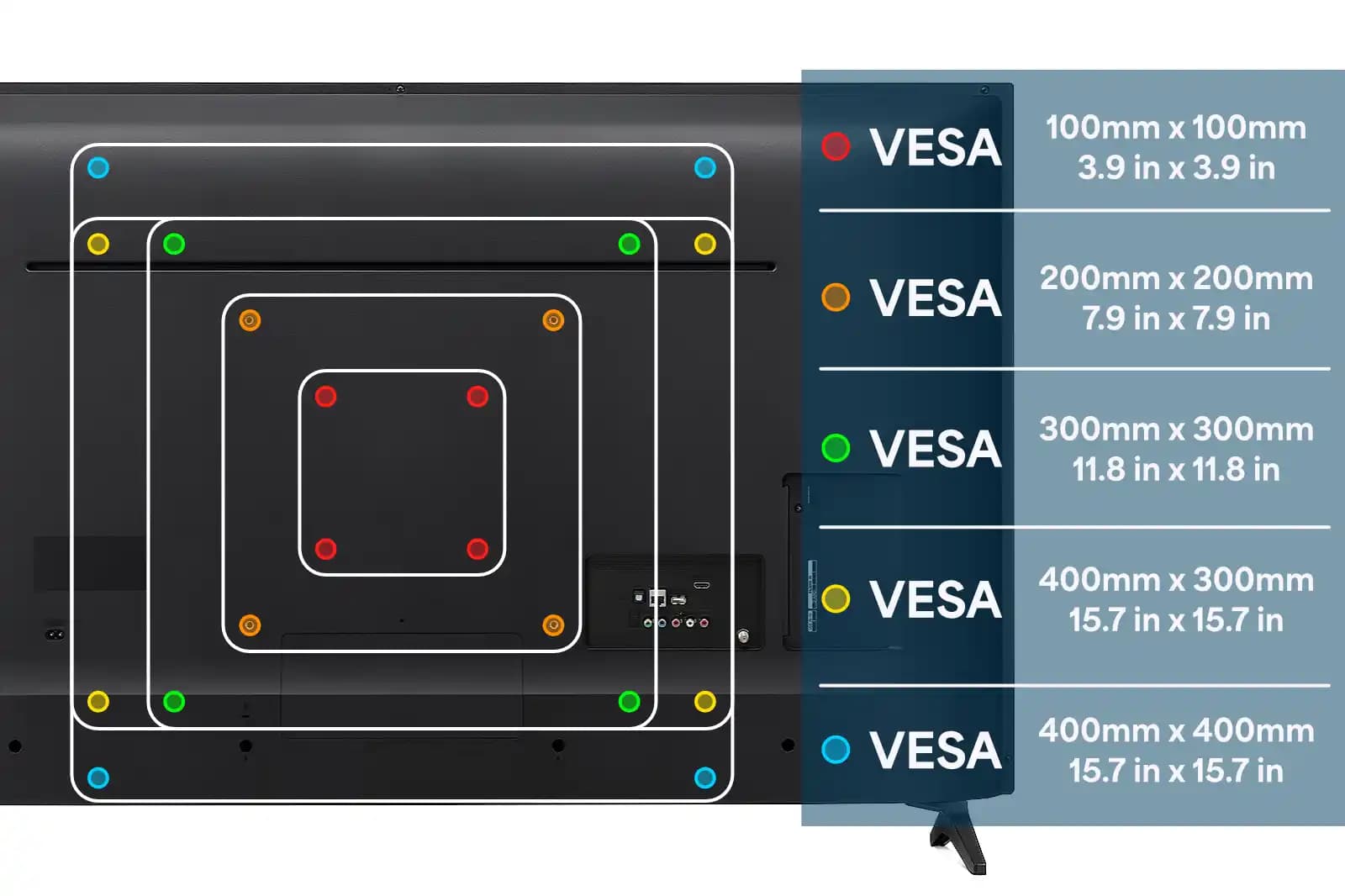
VESA is the four-bolt hole pattern on the back of your TV — if the mount you buy doesn't match those exact dimensions, the bolts won't line up and the mount won't work.
Who's this for: anyone ordering a TV mount online and worried it might not fit, or anyone who already bought the wrong mount and needs to understand why.
This guide explains what VESA is, how to find your TV's size in 60 seconds, the most common patterns by TV size, and what goes wrong when the numbers don't match.
The short answer
- VESA is a bolt hole pattern measured in millimeters — like 400×400 (width × height).
- Every mount lists which VESA sizes it supports. If your TV's VESA isn't on that list, the mount won't fit.
- Most common size: 400×400 covers the majority of 50–75 inch TVs.
- How to find yours: check the TV's spec sheet online, or measure the holes on the back yourself.
- The trap: a mount that says "fits 32–75 inch TVs" might only support VESA up to 400×400 — useless for many 75-inch TVs.
- Skip the guesswork: book a mounting appointment and we bring the right hardware for your specific TV.
What is a VESA pattern?
VESA stands for Video Electronics Standards Association — the group that created a universal standard for TV mounting holes. Instead of every manufacturer using a different bolt pattern, VESA means any compliant TV works with any compliant mount.
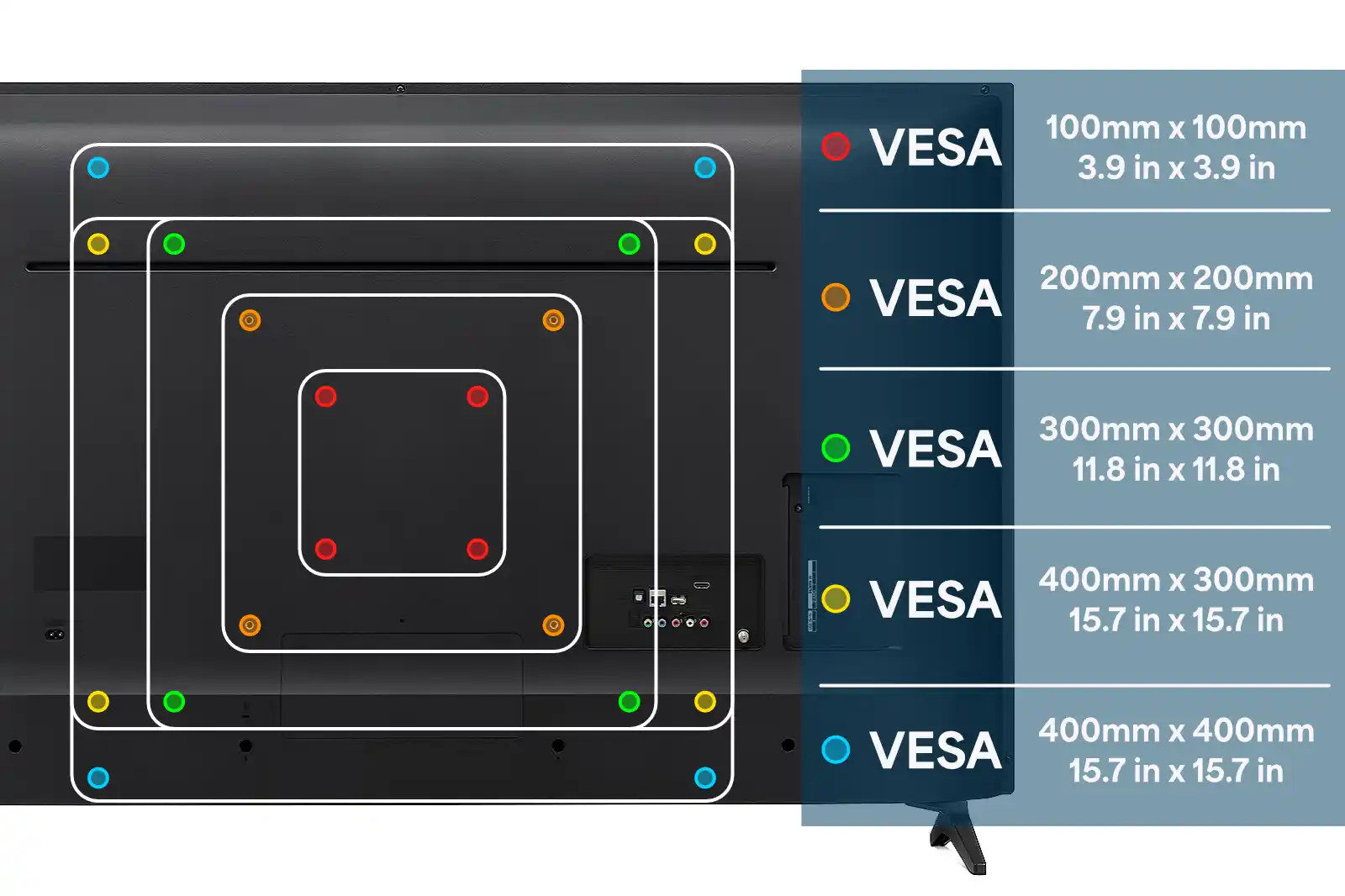
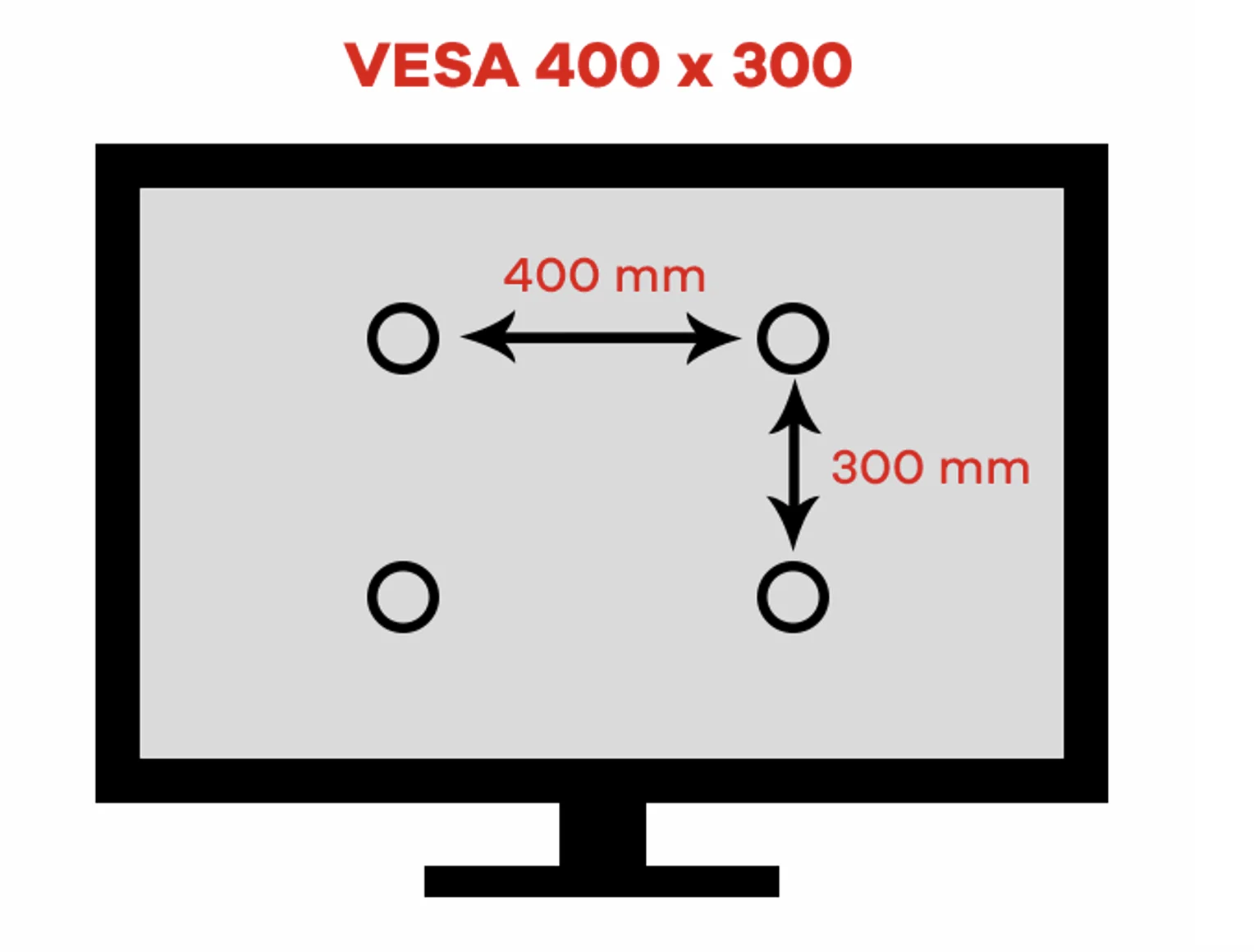
The VESA pattern is the distance between your TV's four mounting holes, measured in millimeters. It's written as width × height. VESA 400×400 means the holes are 400mm apart horizontally and 400mm apart vertically — forming a square. Some patterns are rectangular: VESA 600×400 means 600mm wide and 400mm tall.
The mount you buy must match your exact VESA dimensions, or the bolts simply won't reach the holes.
How to find your TV's VESA pattern
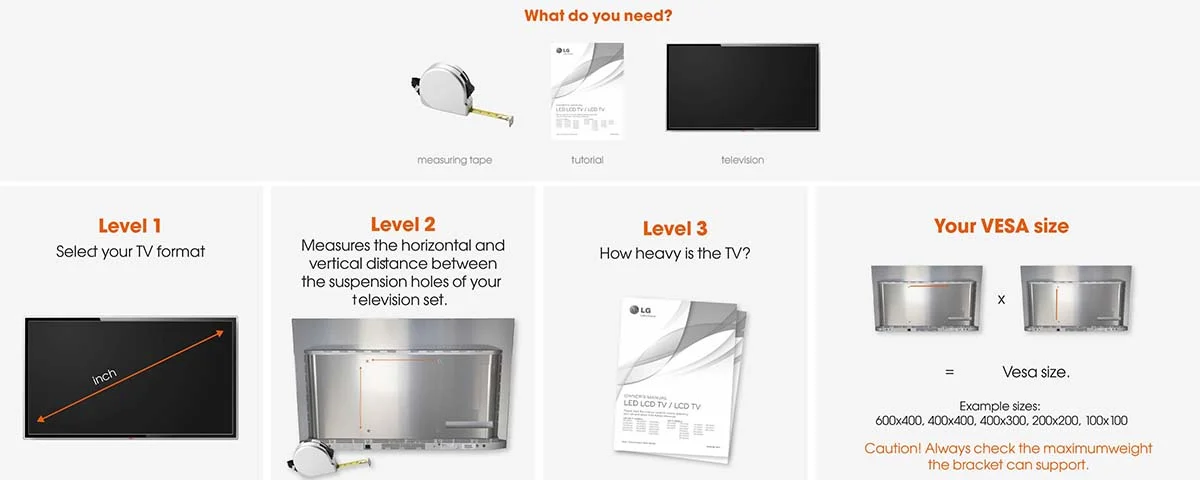
Option 1: Check the spec sheet. Every TV lists its VESA pattern in the specifications section. Search "[your TV model] VESA pattern" and you'll find it on the manufacturer's site or a spec aggregator.
Option 2: Measure it yourself. Flip the TV around and find the four threaded holes on the back. They're usually recessed slightly and may have plastic covers or screws in them. Measure the horizontal distance between left and right holes (center to center), then the vertical distance between top and bottom holes. That's your VESA pattern. Measure in millimeters — or measure in inches and multiply by 25.4.
Then make sure the mount you're buying supports that exact VESA size.
Common VESA sizes by TV size
Every TV is different, but here's what we see on roughly 90% of the TVs we mount across NYC:
| TV Size | Most Common VESA | Also Seen |
|---|
| 32–43 inches | 200×200 | 100×100, 200×100 |
| 50–55 inches | 200×200 or 400×400 | 300×300 |
| 55–65 inches | 400×400 | 600×400 |
| 65–75 inches | 400×400 or 600×400 | 400×300 |
| 75–85 inches | 600×400 | 400×400, 800×400 |
| 85+ inches | 600×400 or 800×400 | 900×600 |
Important: These are the most common patterns, not guarantees. VESA patterns can change every year with each new model release — even within the same brand and screen size. Always check your specific model's spec sheet before buying a mount.
Why VESA matters when buying a mount
Every TV mount lists the VESA patterns it supports. A "universal" mount that says "fits 32–70 inch TVs" might only support VESA up to 400×400. If your 65-inch TV uses 600×400, that mount won't work — even though the size range suggests it should.
The trap: cheap mounts advertise huge TV size ranges but support a narrow VESA range. A mount that says "32–75 inches" but only goes to VESA 400×400 won't work with many 75-inch TVs. Always check the VESA spec, not just the screen size range.
What happens if you get VESA wrong
We've been called to fix this more times than we can count:
- Holes don't line up — the bracket arms can't reach the TV's bolt pattern. Most common version: mount supports 400×400 but the TV needs 600×400.
- Bolts too short — the bolt threads into the TV but doesn't engage enough to hold safely. You need a TV mounting screw kit with longer bolts in the right size.
- Bolts too long — the bolt bottoms out against internal components before tightening. Add the thick black spacer washers that usually come with the mount.
- Wrong bolt diameter — the bolt must match the TV's threaded insert exactly. Check your TV's spec sheet for the bolt size (M4, M6, or M8).
Special cases
Samsung Frame TVs — These usually come with their own Slim Fit mount designed specifically for the Frame. If you want to use a third-party mount instead, check the VESA spec for your exact year model — it can change with each release. See our full Samsung Frame TV installation guide for everything you need to know.
Premium OLED TVs with gallery mounts — Some premium OLED models come with a dedicated flush mount included. The standard VESA patterns on other models vary by size and year. Always double-check your specific model — don't assume based on last year's specs.
Budget-brand TVs — These generally use the most standard VESA patterns (200×200 or 400×400) and work with virtually any universal mount. They're the easiest TVs to find mounts for.
How to check VESA before you buy a mount
- Find your TV's VESA pattern — check the spec sheet online, or measure the holes on the back
- Check the mount's supported VESA range — listed on every mount's product page
- Confirm bolt size — M4, M6, or M8 (listed in your TV's manual)
- When in doubt, buy a mount with a wider VESA range — it costs a few dollars more but prevents the mismatch problem entirely
Or skip the guesswork entirely — book a mounting appointment and we bring the right mount hardware for your specific TV and wall type. We've seen every VESA pattern and every wall type in NYC.
FAQ
What VESA pattern does a 65-inch TV use?
Most 65-inch TVs use VESA 400×400, but some premium models use 600×400. VESA patterns can change year to year even within the same model line — always check your specific TV's spec sheet before buying a mount.
Can I use a VESA adapter if my mount doesn't match?
VESA adapter plates exist — they bolt onto the mount's existing arms and provide a different bolt pattern. They're mostly practical for smaller screens and monitors. For larger TVs, it's usually better to just get the right mount from the start.
Is VESA the same as the TV size?
No. VESA is the bolt pattern measured in millimeters, not the screen size in inches. A 55-inch and a 65-inch TV can have the same VESA pattern (400×400), or two identical 65-inch models from different brands can have completely different VESA patterns.
Do all TV mounts support all VESA patterns?
No. Every mount lists the VESA range it supports. Universal mounts cover the widest range (typically 100×100 to 600×400), while size-specific mounts cover a narrower range. Always check the mount's VESA spec against your TV.
What if I can't find my TV's model number to look up the VESA spec?
The model number is usually on a sticker on the back of the TV, or on the original box. If you genuinely can't find it, measure the holes directly — see the "Measure it yourself" method above. Or book a mounting appointment and we measure before we start.
Not sure what VESA pattern your TV uses or which mount to get? Book a mounting appointment and we handle everything — right mount, right hardware, right wall type. No guesswork.